
Hardware Support
Updated December 2025
Overview of Hardware Support
Your TransitFare hardware may require additional support such as remote troubleshooting and/or warranty support, if the unit is still under warranty. This section explains some of the best practices to follow to ensure you get support that is relevant to your particular situation.
Contacting Us for Hardware Support
Contacting Us for Hardware Support
Contact our support team by email at support@transitfare.com. Provide us with the device's Unique ID or Serial Number and a detailed description of the issue. We may suggest some troubleshooting steps or ask some additional questions to fully understand the issue.
If we determine your hardware issue falls under the scope of hardware warranty, we will send you an RMA number. If we determine your hardware issue does not fall under the scope of hardware warranty, we will notify you, and if you'd like to proceed with the repairs, we will send you an RMA number.
Information to Provide | Example |
| Device's Unique ID or Serial Number | Device IDs and Serial Numbers can come in different formats. Here are some examples:
|
| A detailed description of the issue | Provide detailed information about the symptoms you are observing so we can fully understand the issue. Include your observations about what causes the issue, when the issue happens, if anything seems to resolve the issue, etc. |
Shipping Hardware for Warranty And/Or Repairs - Canadian Customers
Step 1: Contact Us to Get an RMA ID & Packing List
Contact us to describe the issue(s) with the hardware device(s) you'd like to get warranty support for. If we determine the device requires repairs under warranty, or if you've requested out-of-warranty repairs, we will provide you with an RMA ID. Please ensure that the RMA ID is clearly visible on the outside of your shipping box(es). If there are any corrections that need to be made to the Packing List Document, please provide us with the required corrections so we can provide you with an updated form.
| Important 1: | Contact us first to obtain an RMA ID. |
| Important 2: | Do not send hardware to us without first getting an RMA ID. |
| Important 3: | When you send the shipment, share the tracking number with us. |
Step 2: Labeling the Devices
The devices must be clearly labeled with the issue(s) it is experiencing. This labeling is mandatory and ensures our support team can process the repair efficiently.
Step 3: Arranging Your Shipping
Arrange shipping using your preferred shipper to send us the device. We typically receive shipments from UPS, FedEx, DHL and Purolator. It is highly recommended that you obtain a tracking number and email us the tracking number. The device(s) should be shipped to the following address:
Ship To Address
TransitFare
Unit 42
760 Birchmount Road
Toronto, Ontario, M1K 5H8
Canada
Attn: Warranty Support
E: support@transitfare.com
Step 4: Packing Your Shipment
Use double corrugated cardboard to protect your hardware during shipping and ensure there is at least 2″ of padding on all sides (item 1 in the figure below). Bubble wrap, packing paper and/or foam are all good options for padding to protect the device. Ensure that sensitive areas such as displays, keypads, printers, barcode scanner windows, etc, are very protected.
| Critical: |
It is your responsibility to ensure your hardware is sufficiently protected for the shipping process. Please note that goods damaged in transit are not covered under our warranty. Air bags and packing peanuts are not recommended, as they often fail to securely protect the device(s) or prevent shifting inside the box. Recommended packaging options include kraft paper or foam that is completely sealed around the devices. These materials provide firm, consistent support and keep the hardware securely in place during transit. |

Tracking Your Shipment
Track your shipment to ensure that it is received by us. If your carrier experiences problems with the shipment, in most cases you will need to contact the carrier to resolve the issue.
Shipping Hardware for Warranty and/or Repairs - US-based Customers
Step 1: Contact us to get an RMA ID & Packing List
Contact us to describe the issue(s) with the hardware device(s) you'd like to get warranty support for. If we determine the device requires repairs that fall under the scope of hardware warranty, or if you've requested out-of-warranty repairs, we will provide you with an RMA ID. Please ensure that the RMA ID is clearly visible on the outside of your shipping box(es). If there are any corrections that need to be made to the Packing List Document, please provide us with the required corrections so we can provide you with an updated form.
| Important 1: | Contact us first to obtain an RMA ID. |
| Important 2: | Do not send hardware to us without first getting an RMA ID. |
| Important 3: | When you send the shipment, share the tracking number with us. |
Step 2: Labeling the Devices
The devices must be clearly labeled with the issue(s) it is experiencing. This labeling is mandatory and ensures our support team can process the repair efficiently.
Step 3: RMA Letter, Commercial Invoice, Packing List, and CUSMA Form
If you are a US-based transit agency, we will email you the following documents:
- 1 copy of an RMA Letter (Return Merchandise Authorization)
- 3 copies of our Commercial Invoice
- 1 copy of a Packing List
- 1 copy of a CUSMA form (already filled out)
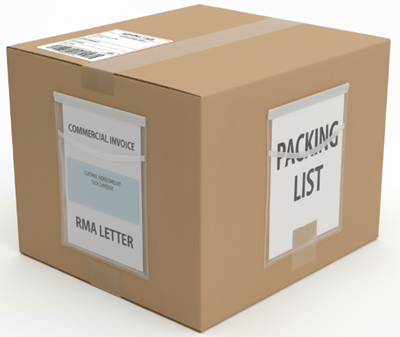
These documents must be affixed to the outside of your shipping box(es) in a clear sleeve. Your carrier will require them to clear the shipment through customs, and it is your responsibility to include these important documents with the shipment.
In summary, attach the following documents to the outside of the boxes so they are clearly visible:
- RMA Letter
- Commercial Invoice (3 copies)
- Packing List (1 copy)
- CUSMA Form (1 copy)
Step 4: Arranging Your Shipping
Arrange shipping using your preferred shipper to send us the device. We typically receive shipments from UPS, FedEx, DHL and Purolator. It is highly recommended that you obtain a tracking number and email us the tracking number. The device(s) should be shipped to the following address:
Ship To Address
TransitFare
Unit 42
760 Birchmount Road
Toronto, Ontario, M1K 5H8
Canada
Attn: Warranty Support
E: support@transitfare.com
Step 5: Packing your Shipment
Use double corrugated cardboard to protect your hardware during shipping and ensure there is at least 2″ of padding on all sides (item 1 in the figure below). Bubble wrap, packing paper and/or foam are all good options for padding to protect the device. Ensure that sensitive areas such as displays, keypads, printers, barcode scanner windows, etc, are very protected.
| Critical: |
It is your responsibility to ensure your hardware is sufficiently protected for the shipping process. Please note that goods damaged in transit are not covered under our warranty. Air bags and packing peanuts are not recommended, as they often fail to securely protect the device(s) or prevent shifting inside the box. Recommended packaging options include kraft paper or foam that is completely sealed around the devices. These materials provide firm, consistent support and keep the hardware securely in place during transit. |
Remember to Include Shipping Document(s)
The following document(s) must be included with your shipment.
| Critical: |
| Missing shipping documents can result in severe delays and/or loss of the shipment. Please note that any severe delays and/or lost shipments are not covered under our warranty. |
The following documents must be attached to the outside of the shipment, in clear sealed pouches.
| Clear sealed pouch 1: | Packing List |
| Clear sealed pouch 2: | Shipping Label |
| Clear sealed pouch 3: | Commercial Invoice Copy 1, 2, 3 |
| Clear sealed pouch 4: | CUSMA Certification of Origin and NO COST, NO COMMERCIAL VALUE RMA letter |
| IMPORTANT | The shipping label must be attached in a separate clear sealed pouch. Do not place it with other documents such as the Commercial Invoice, Packing List, or CUSMA. |
Tracking your Shipment
Track your shipment to ensure that it is received by us. If your carrier experiences problems with the shipment, in most cases you will need to contact the carrier to resolve the issue.
The Repair Process
Once your device arrives to TransitFare, the repair and testing process can take from 5 to 15 business days. The repair process is as follows:
- Attempt to reproduce the issue as you have described it.
- If the issue can be reproduced, identify the root cause.
- Resolve the root cause.
- Perform our standard new device test cycle (3 days) to ensure it is fully functional.
Returning the Device
Upon completion of the repair process, TransitFare will complete a repair summary and return the device to you using standard ground shipping.
Warranty Packing List
The Warranty Packing List document will be emailed to you when the device is ready to ship back to you. The Warranty Packing List will include the following information:
- A tracking number for the shipment. It is your responsibility to track the shipment and ensure you receive it.
- A description of the root cause and repair(s) completed for the device. If the issue could not be reproduced, the device will be returned without having any repairs completed.
Extended Warranty
Extended Warranty options may be available at an added cost with the following features:
- Hardware warranty coverage beyond the standard one (1) year term.
- Hardware warranty coverage for hardware issues that are not covered in the standard warranty.
- Hardware warranty coverage to provide a replacement device.
- Other customized warranty coverage is possible.